
Free UK wedding planner spreadsheet
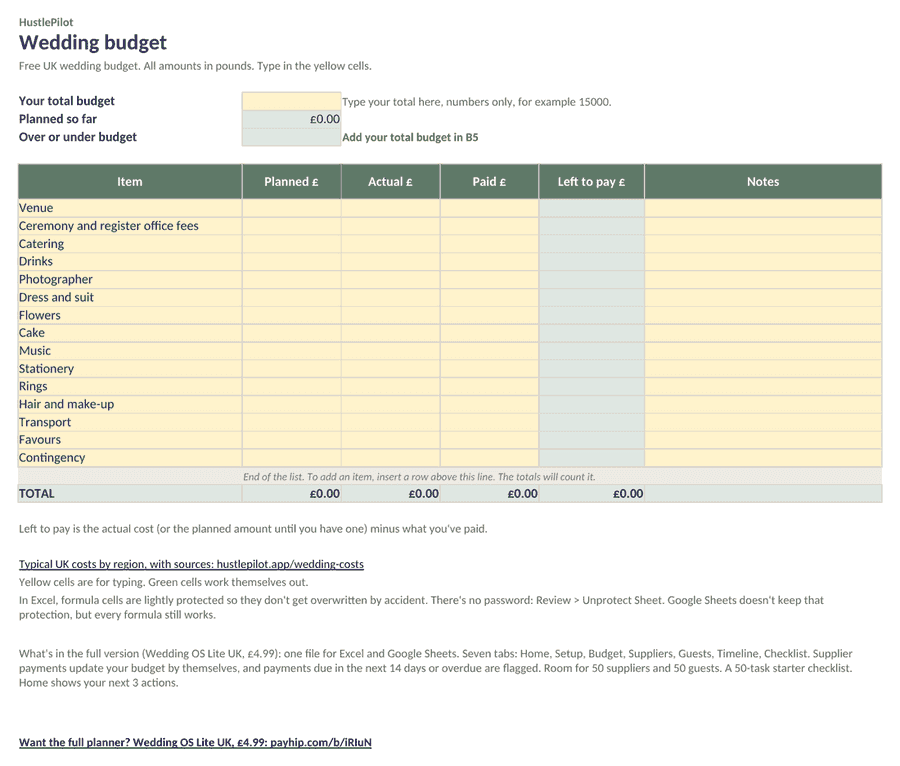
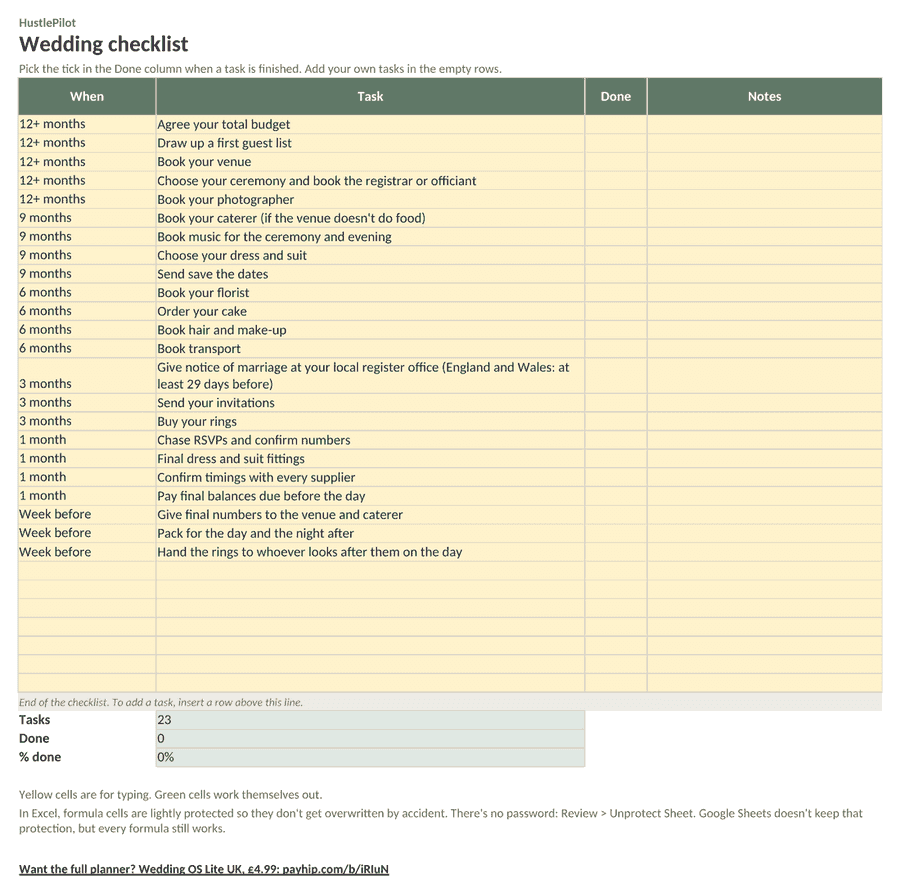
A free wedding budget and checklist in one small file, for Excel and Google Sheets. Everything is in pounds and it starts blank, so you plan with your own numbers. There's no sign-up to download.
Not sure what things cost? See typical costs by region or try the wedding budget calculator.
What's in it
Download the free planner
Two tabs: Budget and Checklist. Free, no sign-up, no email needed.
Email me when the planner is updated
Optional. You don't need this to download.
Want the full planner? Wedding OS Lite UK, £4.99: one file for Excel and Google Sheets with your budget, suppliers and payments due, guests, timeline and a 50-task checklist, plus a Home screen that shows what's left and your next 3 actions.
How to use it
- Download the Excel file, or upload it to Google Sheets.
- Type your total budget and planned amounts in the yellow cells. The green cells work out your totals, what's left to pay and whether you're over or under budget.
- As you book and pay, add actual costs and payments, and tick off the checklist as you go.
Yellow cells are for typing. Green cells work themselves out. In the Excel file, formula cells are lightly protected with no password (Review > Unprotect Sheet). Google Sheets doesn't keep that protection, but every formula still works.
Using it in Google Sheets
Download the Excel file, upload it to Google Drive, then open it with Google Sheets. If it opens in Office editing mode, choose File > Save as Google Sheets. Then set File > Settings > Locale to United Kingdom.
FAQs
- Is the planner really free?
- Yes. Download the Excel file or upload it to Google Sheets. There's no sign-up and no email needed. If you'd like to hear when it's updated, there's an optional box for that.
- Does it work in Google Sheets?
- Yes, every formula works in Google Sheets. Download the Excel file, upload it to Google Drive, then open it with Google Sheets. If it opens in Office editing mode, choose File > Save as Google Sheets. In the Excel file, formula cells are lightly protected with no password. Google Sheets doesn't keep that protection, so just type in the yellow cells.
- Is it in pounds?
- Yes. Every amount is in £. Type numbers only, for example 450, and the £ appears by itself. The checklist uses UK steps, such as giving notice of marriage at your register office.
- Can I add more budget lines or tasks?
- Yes. Insert a row above the grey end-of-list line and the totals count it. Use the empty yellow rows on the Checklist for your own tasks.
- What's in the full version?
- Wedding OS Lite UK (£4.99) is one file for Excel and Google Sheets with seven tabs: Home, Setup, Budget, Suppliers, Guests, Timeline and Checklist. Add a supplier payment and your budget updates by itself. Payments due in the next 14 days, or overdue, are flagged. Home shows your budget remaining, payments due, days to go, guests, checklist progress and your next 3 actions. There's room for 50 suppliers and 50 guests, and a checklist with 50 starter tasks plus room for your own. The download comes with a 2-page setup guide.
Want the full planner? Wedding OS Lite UK, £4.99: one file for Excel and Google Sheets with your budget, suppliers and payments due, guests, timeline and a 50-task checklist, plus a Home screen that shows what's left and your next 3 actions.
Wedding budget calculator · UK wedding costs by region · Yorkshire wedding costs